Submitted by yejr on 周三, 2013/08/07 - 10:44
昨天在群里看到有新同学还在问MySQL无法启动的问题,于是总结了几个常见情况,权当普及帖了,老鸟自觉飞过。
问题1:目录、文件权限设置不正确
MySQL的$datadir目录,及其下属目录、文件权限属性设置不正确,导致MySQL无法正常读写文件,无法启动。
错误信息例如:
mysqld_safe Starting mysqld daemon with databases from /usr/local/mysql/data
/usr/local/mysql/bin/mysqld_safe: line 107: /usr/local/mysql/data/imysql.local.err: Permission denied
问题2:端口冲突
已有其他mysqld实例启动,且占用了相同端口,需要修改 port 选项。
错误信息例如:
Submitted by yejr on 周五, 2013/04/26 - 16:19
线上有个数据表,字符集是utf8,但由于环境不统一的原因,导致实际上数据表存储的内容是latin1内码的数据。
也就是说,借着utf8的壳子,实际存储着latin1字符集的数据。
在这种情况下,需要注意几个字符集配置:
- 客户端终端工具(SecureCRT)的显示字符集设置为:utf-8,
- Linux终端(TERM)下,设置LANG环境变量为:en_US.UTF-8,或者zh_CN.UTF-8,
- 连接到MySQL后,设置client/connect字符集为:latin1 (set names latin1)。
完成上述设置后,在Linux命令行的mysql cli客户端中才能正常显示中文。
为了统一,需要将这些数据的内码也转成utf8才行,可以按以下几个步骤完成:
Submitted by yejr on 周四, 2013/01/17 - 23:28
最近在用mysqldump备份时,想要把数据表和数据分开备份,因此做了2次备份。
执行备份数据库表结构时,指定了 --skip-opt 选项,相当于禁用下面几个参数:
--add-drop-table, --add-locks,
--create-options, --quick, --extended-insert,
--lock-tables, --set-charset, and --disable-keys
选项 --create-option 看起来比较不起眼:
  -a, --create-options
      Include all MySQL specific create options.
事实上,如果把它disable的话,备份出来的表结构,会少了:
Submitted by yejr on 周三, 2013/01/09 - 20:39
问:刚刚新安装的MySQL,提示下面信息,无法登入,怎么回事?
[root@imysql mysql]# mysql mysql
ERROR 1045 (28000): Access denied for user 'root'@'localhost' (using password: NO)
答:数据库已经执行过 mysql_install_db 初始化了,按理说应该没问题。经过排查,发现 $datadir 的 mysql 数据库目录的权限模式为:
drwx------ 2 mysql root 4096 Jan 9 20:22 mysql
看起来没有问题。检查错误日志,发现一行:
Submitted by yejr on 周五, 2012/12/21 - 20:55
Submitted by yejr on 周五, 2012/12/21 - 20:43
tpch是TPC(Transaction Processing Performance Council)组织提供的工具包。用于进行OLAP测试,以评估商业分析中决策支持系统(DSS)的性能。它包含了一整套面向商业的ad-hoc查询和并发数据修改,强调测试的是数据库、平台和I/O性能,关注查询能力。
官网:http://www.tpc.org/tpch
下载地址:http://www.tpc.org/tpch/spec/tpch_2_14_3.tgz
或
http://www.tpc.org/tpch/spec/tpch_2_14_3.zip
1、编译安装
下载源码包,解压缩,然后:
cp makefile.suite makefile
修改makefile文件中的CC、DATABASE、MACHINE、WORKLOAD等定义:
################
## CHANGE NAME OF ANSI COMPILER HERE
################
CC      = gcc
# Current values for DATABASE are: INFORMIX, DB2, ORACLE,
#                                  SQLSERVER, SYBASE, TDAT (Teradata)
# Current values for MACHINE are:  ATT, DOS, HP, IBM, ICL, MVS,
#                                  SGI, SUN, U2200, VMS, LINUX, WIN32
# Current values for WORKLOAD are:  TPCH
DATABASE= MYSQL
MACHINE = LINUX
WORKLOAD = TPCH
Submitted by yejr on 周四, 2012/12/13 - 13:58
同事报告一起奇怪的现象,一个最简单的测试PHP代码,在测试环境很正常,但是在正式环境下,无论用何种方式(tcp/ip、unix socket)都无法连接mysql。
我协助查看了下,确实如此,无论是指定IP、端口的tcp/ip方式连接,或者是用unix socket方式连接,报错信息都类似:
Could not connect: Can't connect to MySQL server on 'MYSQL.SERVER' (13)
无论如何修改MySQL的授权,或者调整php.ini中关于MySQL的设置,或者修改MySQL的监听网口,都无法解决。
而如果用命令行人工连接MySQL,则一切正常。
问题看起来像是php(with apache)不被允许连接MySQL,但是防火墙也没有限制。想来想去,唯有SELinux的因素会导致这个问题。
Submitted by yejr on 周四, 2012/10/11 - 20:26
Submitted by yejr on 周五, 2012/09/21 - 17:02
前言:MySQL发展到今天,InnoDB引擎已经作为绝对的主力,除了像大数据量分析等比较特殊领域需求外,它适用于众多场景。然而,仍有不少开发者还在“执迷不悟”的使用MyISAM引擎,觉得对InnoDB无法把握好,还是MyISAM简单省事,还能支持快速COUNT(*)。本文是由于最近几天帮忙处理discuz论坛有感而发,希望能对广大开发者有帮助。
1. 快速认识InnoDB
InnoDB是MySQL下使用最广泛的引擎,它是基于MySQL的高可扩展性和高性能存储引擎,从5.5版本开始,它已经成为了默认引擎。
InnODB引擎支持众多特性:
a) 支持ACID,简单地说就是支持事务完整性、一致性;
b) 支持行锁,以及类似ORACLE的一致性读,多用户并发;
c) 独有的聚集索引主键设计方式,可大幅提升并发读写性能;
d) 支持外键;
e) 支持崩溃数据自修复;
InnoDB有这么多特性,比MyISAM来的优秀多了,还犹豫什么,果断的切换到InnoDB引擎吧 :)
2. 修改InnoDB配置选项
可以选择官方版本,或者Percona的分支,如果不知道在哪下载,就google吧。
安装完MySQL后,需要适当修改下my.cnf配置文件,针对InnoDB相关的选项做一些调整,才能较好的运行InnoDB。
相关的选项有:
Submitted by yejr on 周一, 2012/08/20 - 17:25
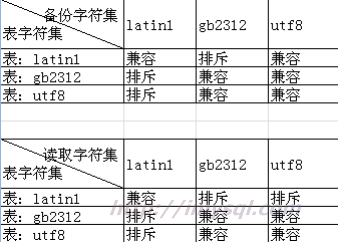
之前做过的兼容性测试结果:
页面



最近评论